Alhazen-OCR: Reading Arabic Institutional Documents
A compact, open-weight OCR model for formal Arabic forms, invoices, and institutional paperwork. Trained on license-clean data, meant to run where sensitive documents already live.
Digitizing Arabic documents is still hard to do well. Forms, invoices, and scanned correspondence pile up faster than teams can type them in, and off-the-shelf OCR often fails on the layouts institutions actually use. Today we're releasing Alhazen-OCR, an open-weight model built for that workload: formal institutional Arabic documents.
TL;DR
Alhazen-OCR is a compact QLoRA adapter for printed Arabic forms, invoices, and handwriting-heavy pages. On held-out eval it cuts character error from 0.79 → 0.28 CER versus Qwen3-VL-2B-Instruct (WER 0.95 → 0.45), and also improves on external KHATT handwriting (1.89 → 1.12 CER). Weights and evaluation code are open. Training data: context212/context212-alhazen-ocr.
Named after Ibn al-Haytham (Alhazen), the 11th-century scholar who founded the science of optics.
The problem: institutional Arabic stays trapped in pixels
OCR research still leans on Latin scripts and consumer scans. Formal Arabic documents do not fit that mold. Layouts run right to left. Letters join. Tables are dense. Headers are often bilingual. Stamps and handwritten notes show up on otherwise printed forms.
Closed cloud APIs help when data can leave the building. Many institutions cannot allow that. Large general-purpose document models are often too heavy to run on-premise next to the archive. Regulated teams need something smaller, license-clean, and aimed at the paperwork they actually process.
Results
Evaluated with CER/WER (lower is better) on the held-out eval split of context212/context212-alhazen-ocr and on the external ahmedheakl/arocrbench_khatt benchmark (50 samples each, greedy decoding):
| Model | Eval CER ↓ | Eval WER ↓ | KHATT CER ↓ | KHATT WER ↓ |
|---|---|---|---|---|
| Qwen3-VL-2B-Instruct (base) | 0.792 | 0.947 | 1.893 | 1.801 |
| Alhazen-OCR | 0.281 | 0.448 | 1.121 | 1.215 |
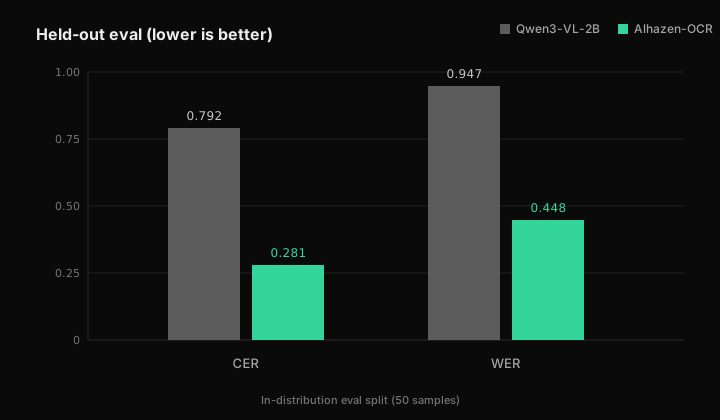
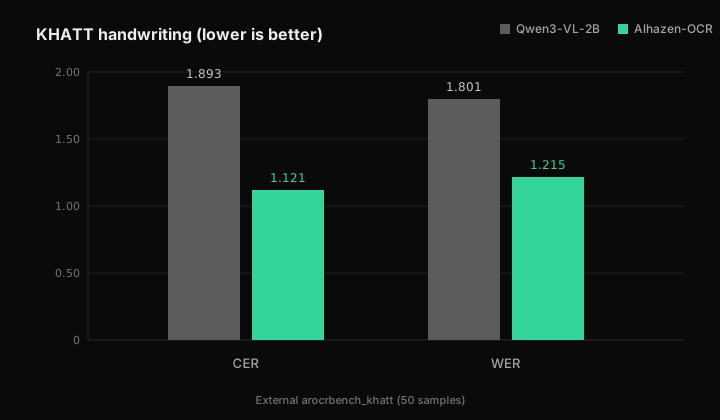
Fine-tuning cuts held-out character error from 0.79 → 0.28 CER and word error from 0.95 → 0.45. On external KHATT handwriting, CER/WER also improve versus the untuned base (1.89 → 1.12 CER). An earlier synthetic-heavy mix had regressed on KHATT; this release uses a handwriting-heavier mix (~45% KHATT paragraphs, ~35% synthetic printed, ~20% invoices) with KHATT-bench transcript overlap removed from train.
A single epoch is enough. The second does not plateau; it diverges. Printed forms and invoices remain the design target; KHATT is better than before but still hard (CER above 1.0 means many lines are wrong). Better an honest baseline than a cherry-picked demo.
Usage with vLLM
Alhazen-OCR is a LoRA adapter. Serve the open 2B vision-language base with the adapter attached, then call the OpenAI-compatible chat endpoint.
vllm serve Qwen/Qwen3-VL-2B-Instruct \
  --enable-lora \
  --lora-modules alhazen=context212/alhazen-ocr \
  --limit-mm-per-prompt '{"image": 1}' \
  --mm-processor-cache-gb 0 \
  --no-enable-prefix-caching
import base64
from pathlib import Path
import requests
ENDPOINT = "http://localhost:8000/v1/chat/completions"
MODEL = "alhazen" # LoRA module name from --lora-modules
image_path = Path("form.png") # scanned form, invoice, or page render
image_base64 = base64.b64encode(image_path.read_bytes()).decode("utf-8")
payload = {
"model": MODEL,
"messages": [
{
"role": "user",
"content": [
{
"type": "image_url",
"image_url": {
"url": f"data:image/png;base64,{image_base64}"
},
},
{
"type": "text",
"text": (
"Extract all the text from this image, "
"preserving the original reading order."
),
},
],
}
],
"max_tokens": 2048,
"temperature": 0.0,
}
response = requests.post(ENDPOINT, json=payload, timeout=120)
text = response.json()["choices"][0]["message"]["content"]
print(text)For PDFs, render each page to an image first (about 200 DPI works well), then send one page per request. Keep temperature at 0 for deterministic transcription.
Links
- Model:
context212/alhazen-ocr(Apache-2.0) - Dataset:
context212/context212-alhazen-ocr - Code: training, data pipeline, and evaluation at
github.com/context212/atlas-ocr